
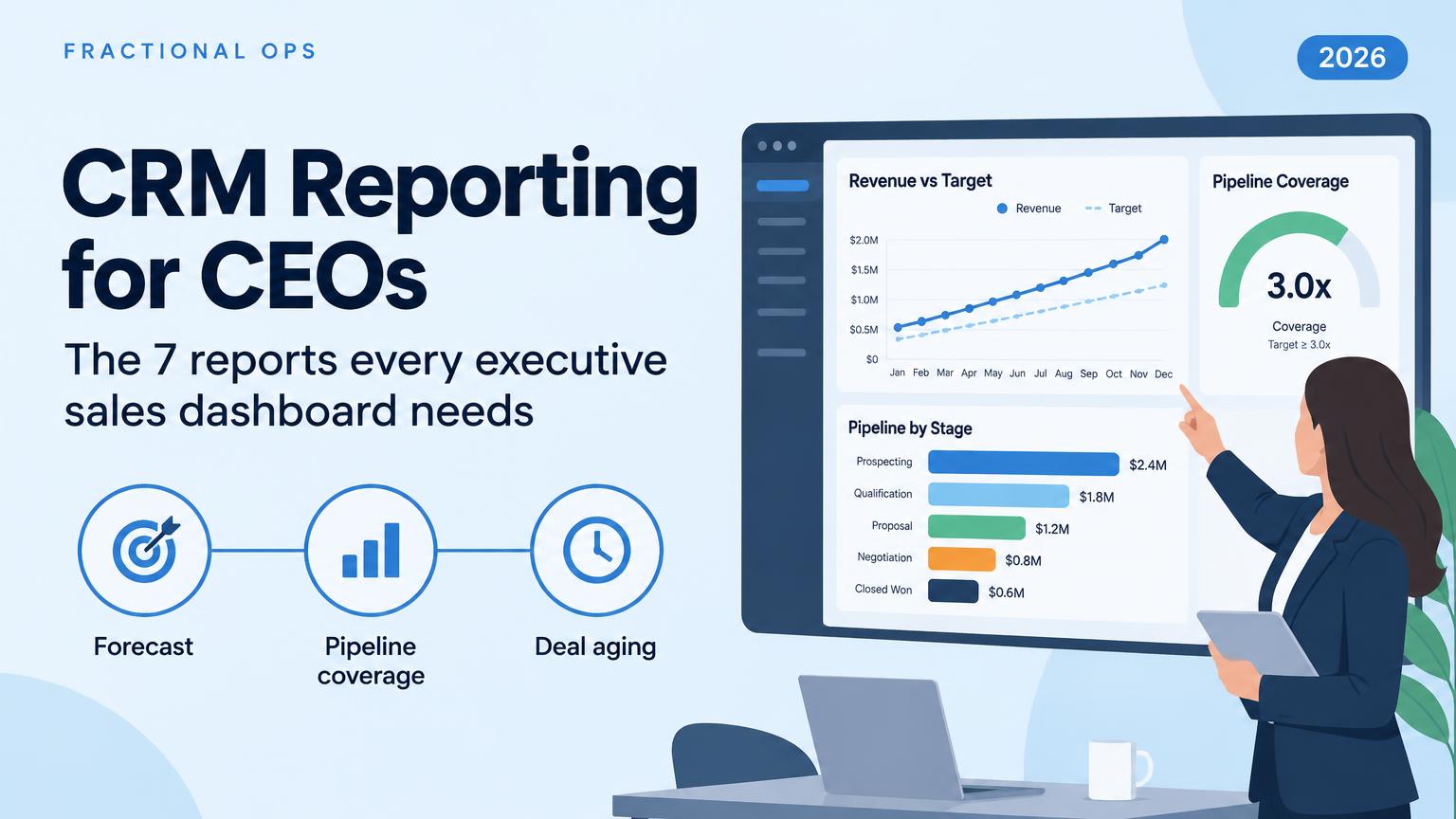
Your CRM dashboard shouldn't be a collection of colourful charts that everybody ignores. CRM reporting for an executive has three jobs: tell you whether you're going to hit the number, show you where the risk is, and point at the decision you need to make. Seven reports cover it: revenue vs target and forecast, pipeline coverage, pipeline by stage, deal velocity and aging, conversion by stage, pipeline and revenue by source, and follow-up and execution. They only earn a place on an executive dashboard if they connect, so a short forecast traces back to a cause. And none of it works unless every deal has an owner, value, stage, close date, forecast category, last activity and next step.
We've built these dashboards in HubSpot, Salesforce and monday CRM for owner-led B2B companies, and it's the same seven reports every time. The CRM changes where you click. It doesn't change what a CEO needs to see on Monday morning. You can see the forecasting and deal-health views we build for executives to get a sense of what that looks like in practice.
What Should CRM Reporting Tell a CEO?
CRM reporting is turning the deal, activity and revenue data already in your CRM into reports that show whether the business will hit its number, where that number is at risk, and what to change this week. The definition doesn't change whether you run HubSpot, Salesforce, monday CRM, Pipedrive, Zoho CRM or Microsoft Dynamics 365.
Here's the limit before the benefit. Most CRM dashboards I'm shown were built by whoever had spare capacity when the CRM went in, with a chart for every column somebody thought might matter. A dashboard with thirty charts isn't more informative than one with seven. It's less, because nobody reads it.
A CRM report answers one question about a set of records for a period. A CRM dashboard puts several reports on one screen so you can read them together. The difference matters, because an executive dashboard is only useful when its reports are chosen to explain each other. Seven reports that each answer their own question is a slideshow. Seven that connect is a diagnosis, and it's the thinking behind the single executive view we build for CEOs.
This is written for the owner or CEO who reviews the business weekly, not for the rep. Reps need a different dashboard: their deals, their tasks, today. Mixing the two is how an executive dashboard ends up with a leaderboard of emails sent on it. If nobody on your team owns that split, that's the first gap to close, and it's the same question as who owns the forecast when there's no RevOps hire.
Which 7 Reports Belong on an Executive Sales Dashboard?
Read in this order, these seven CRM reports cover the whole pipeline, from where leads come from to whether the quarter lands. The cadence and owner columns matter as much as the report itself, because a report nobody acts on is decoration. It's the same structure we use when we design pipeline stages, routing and forecast rules for clients.
| Report | Question it answers | Core metric | Review cadence | Who acts on it |
|---|---|---|---|---|
| 1. Revenue vs target and forecast | Will we hit the number? | Closed + forecast vs target, remaining gap | Weekly | CEO, sales lead |
| 2. Pipeline coverage | Is there enough pipeline to close the gap? | Open pipeline ÷ remaining target | Weekly | Sales lead |
| 3. Pipeline by stage | Where is value piling up? | Value and count per stage | Weekly | Sales lead |
| 4. Deal velocity and aging | What's stuck? | Days in stage, days since activity, close-date changes | Weekly | Sales manager |
| 5. Conversion by stage | Where do deals leak? | Stage-to-stage conversion rate by rep and source | Monthly | Sales lead |
| 6. Pipeline and revenue by source | Where should we invest? | Qualified pipeline and closed revenue by source | Monthly | CEO, marketing |
| 7. Follow-up and execution | Is the process being followed? | Speed to lead, overdue follow-ups, deals without a next step | Weekly | Sales manager |
The 7 CRM Reports, One by One
1. Revenue vs Target and Forecast
This report shows what has already closed, the target for the period, the remaining gap, and the current forecast against that gap. It sounds obvious. Most of the teams we're brought into don't have it built, or they have a revenue chart with no target line, which is a history lesson rather than a forecast. Start here.
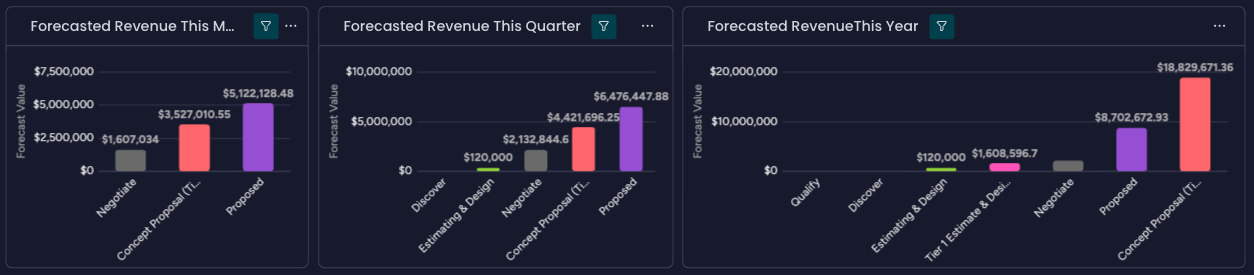
Break the forecast down by forecast category, not just by stage. Stage is where a deal sits in your process. Forecast category is the rep's call on whether it closes this period, usually Commit, Best Case or Pipeline. A deal in negotiation can still be Best Case. HubSpot, Salesforce and monday CRM all support forecast categories, and we've compared how forecasting and reporting differ between HubSpot and monday CRM if you're still choosing.
Most CRMs also show a weighted pipeline: each deal's value multiplied by a probability tied to its stage. It's a reasonable estimate of what will close. It isn't the same thing as coverage, which is the next report, and confusing the two is the most common mistake I see on executive dashboards.
2. Pipeline Coverage
Pipeline coverage tells you whether there's enough pipeline to realistically hit the target. The formula is simple: open pipeline dated to close this period, divided by the revenue you still need. If you've got $600,000 left to close and $1.8 million in pipeline dated this quarter, you're at 3x coverage.
Pipeline coverage = open pipeline closing this period ÷ (target − closed to date) Coverage you need ≈ 1 ÷ your historical win rate
3x is the number everyone quotes. It's only right if you win about a third of what you work. Win 25% and you need 4x. Win 20% and you need 5x. The right coverage ratio is set by your own conversion rate, not by a rule of thumb from someone else's sales team.
| Worked example (one quarter) | Amount |
|---|---|
| Target | $1,000,000 |
| Closed to date | $400,000 |
| Remaining gap | $600,000 |
| Open pipeline dated this quarter | $1,800,000 |
| Coverage | 3.0x |
| Historical win rate | 25% |
| Coverage needed (1 ÷ 25%) | 4.0x |
| Pipeline needed | $2,400,000 |
| Shortfall | $600,000 |
That team looks fine on most dashboards. It's $600,000 short of the pipeline it needs, and a weighted view won't say so either. Weight the same $1.8 million by stage ($800,000 in discovery at 10%, $600,000 in proposal at 40%, $400,000 in negotiation at 60%) and you get $560,000 against a $600,000 gap. Two different numbers, both telling you the quarter is at risk, for different reasons.
That's the distinction. Weighted pipeline is a forecast: your best guess at what closes. Coverage is a capacity check: whether there's enough raw material to hit the number at your real win rate. You want both, and neither accounts for deals that slip into next quarter. Show coverage by stage, and track how much pipeline slipped out of the period last month. Salesforce ships Gap to Quota and Pipeline Coverage as custom forecast columns, which tells you how standard this check should be.
A mid-sized manufacturer brought us in with annual and quarterly revenue goals already set, but nobody had checked them against historical conversion rates or how long deals sat in each stage. We built an app in their CRM showing stage-to-stage conversion and velocity, then a pipeline coverage metric so they knew what multiple of pipeline they needed at all times. Their CFO tied the forecast to the cash flow forecast. The bottleneck sat between first pitch and negotiation, so that's where we pointed an AI follow-up system.
3. Pipeline by Stage
This CRM report shows how much value, and how many deals, sit in discovery, proposal, negotiation and closed. It's where bottlenecks show up first. If everything is stuck in proposal, the problem probably isn't lead generation. It's pricing, qualification, follow-up or the proposal process itself, and adding more leads to a pipeline that's jammed at proposal just makes the jam bigger. That's a proposal problem, not a pipeline problem.
4. Deal Velocity and Aging
Track the average sales cycle length, days in each stage, deals with no recent activity, and opportunities whose close dates keep moving. A large pipeline isn't useful if half of it has been sitting untouched for 60 days. This is the report that turns a pipeline number into a list of deals someone needs to call, and it's the backbone of the deal health and risk views we build for sales leaders.
Deal velocity and deal aging get used interchangeably, and they shouldn't be. Sales velocity is a throughput formula: number of opportunities × average deal value × win rate ÷ sales cycle length. It's a good monthly trend line. Deal aging is per deal: how long this one has sat in this stage, and when someone last touched it. The CEO needs aging on the executive dashboard, because aging tells you which deals to ask about on Monday.
The best early warning of a slip is a close date that keeps moving. Count how many times each deal's expected close date has changed. A deal that's been pushed three times isn't a Q4 deal. It's a deal nobody wants to call dead, and it's exactly what an AI pipeline monitor flags once your stages mean one thing each.
5. Conversion Rate by Stage
This CRM report tracks the percentage of leads that become qualified opportunities, opportunities that reach proposal, and proposals that become closed-won deals. Filter it by rep, lead source, product or customer segment. That tells you whether the problem is at the top of the funnel, in qualification, or in the actual selling.
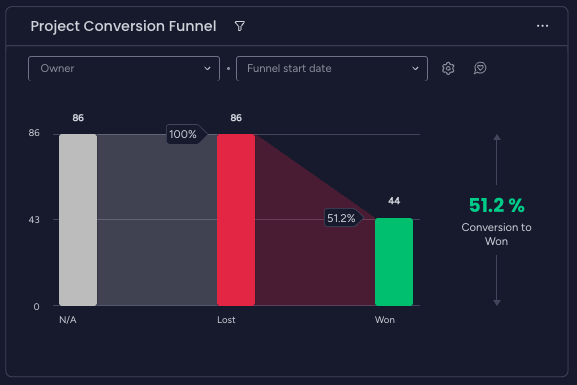
One warning. Win rate is too noisy to read weekly for a team with a handful of reps and a few dozen deals a quarter. Two lost deals swing it ten points. Review conversion rate monthly or quarterly, and save the weekly slot for the reports that actually move week to week. It's one of the first cadence decisions we settle in a monthly plan's standing review.
6. Pipeline and Revenue by Source
Don't just report how many leads came from Google, referrals, events, partners or outbound campaigns. Report which sources produced qualified pipeline and closed revenue. One source can send hundreds of leads that go nowhere while another sends ten leads and three major deals. Leadership needs to know where to keep investing, and lead counts point you at the noisiest channel.
Ready to put monday.com AI to work?
Book a free consultation with our certified monday AI team and leave with three recommendations you can act on.
This report has a setup prerequisite most teams miss. The source has to be captured when the record is created and never overwritten. If a rep can change the source field, the report measures memory, not marketing. Attribution is a build decision, not a reporting one, and it's part of what we scope in a fixed-price CRM build.
We worked with a modular construction company already on monday CRM. We started with their inbound leads board: syncing UTMs, last-touch attribution, campaign tracking and landing page data straight from their website into the CRM, then building agents to qualify and route leads. They had dozens of leads a day, so the issues that surfaced during testing were preferences, not expensive errors. Once the sales team was comfortable, we moved to live deals.
7. Follow-up and Execution
I'm not talking about a leaderboard that celebrates whoever sent the most emails. Track speed to lead, overdue follow-ups, deals without a scheduled next step, last activity date, and the percentage of active deals with complete records. Those metrics tell you whether the sales process is actually being followed, which is the question most dashboards never ask.
Reports one through six tell you the outcome. This one tells you whether the process producing it exists outside the SOP binder. It's also your leading indicator: follow-up slips weeks before the forecast does, so a manager who watches it can act while the quarter is still open. It's the part of the system we check every week when we run it for clients month to month.
We support a 200-person manufacturer with only six salespeople. Before we started, there was almost no useful information in the CRM: no emails, no discovery, no qualification, everything living in individual inboxes. Now the systems are synced and agents send proactive updates and draft emails when a lead goes quiet. The CRM used to feel like homework. Now the team looks forward to it.
Why Is the Forecast Short? How the 7 Reports Connect
Here's the part most dashboards miss. If the forecast is below target, you should be able to see whether the cause is coverage, conversion, velocity or follow-up, in about five minutes. If you can't, the CRM reports are on the same screen but they aren't connected. Each one should send you to the next, which is how exceptions on an executive view should surface without anyone chasing updates.
| What you see | Check next | Likely cause | First move |
|---|---|---|---|
| Forecast below target, coverage under your required ratio | Report 6 (source) | Not enough pipeline being created | Fix generation, not closing |
| Coverage looks fine, but value is piled up in one stage | Reports 3 and 5 | A stage bottleneck: pricing, qualification or proposal process | Inspect the deals stuck in that stage |
| Coverage and conversion fine, close dates keep moving | Report 4 | Deals slipping on optimistic close dates | Re-date or downgrade, then recheck coverage |
| Plenty of leads, little closed revenue | Reports 5 and 6 | Source mix rewarding volume over quality | Shift spend toward the sources that close |
| Every report looks healthy and the forecast still misses | Report 7, then the next section | The data underneath is wrong | Fix the records before trusting any report |
The last row is the most common, and it isn't a reporting problem. It's a management problem the dashboard makes visible. No chart fixes it. The fix lives in the four conditions that sit underneath every CRM, which is what the next section covers.
We support an 80+ person company in a blue-collar industry that runs on EOS. They used ninety.io for their Level 10 meetings and weekly scorecard. We built a monday Agent to gather KPIs and KLIs across projects and feed a scorecard app built in monday Vibe. Through MCP, the agent uses ninety.io like an employee would: updating the scorecard, suggesting issues, even suggesting rocks for the next quarterly planning session.
What Has to Be True in Your CRM Before Any of This Works
Every report above is only as good as the records underneath it. That's true in HubSpot, Salesforce and monday CRM, and AI doesn't change it. An agent pointed at half-filled fields produces confident nonsense at scale. That's the catch with AI agents on every platform, and it's the same catch with dashboards.
Seven fields. Every deal, every time:
- Owner. Without it, nothing rolls up by rep.
- Value. Without it, coverage and revenue are fiction.
- Stage. Without it, Reports 3 and 5 go blank.
- Expected close date. Without it, coverage can't be tied to a period.
- Forecast category. Without it, Report 1 is a guess.
- Last activity date. Without it, aging is invisible.
- Next step. Without it, the follow-up report is empty.
Make each field required at the stage where it matters. Don't send a reminder email and hope. If close date is required to move a deal into proposal, it gets filled in, because the rep wants the deal in proposal. That's how every opportunity ends up with an owner and a next step without a manager chasing it.
Expect the first two weeks to feel like going backwards. The dashboard gets worse before it gets accurate, because you're finally seeing the gaps that were always there. This is the point where CEOs go from interested to mildly frustrated. Push through. A forecast that looks clean and is wrong is worse than one that looks messy and is right.
A professional services company had been on their CRM for over a year, set up by a junior sales coordinator who'd since left. They had multi-page SOPs for every part of the revenue process: roles, workflow diagrams, discovery questions by stage, routing by lead source. The CRM looked like an Excel sheet. Thirty days later it reflected the documented process, and an agent filled the discovery fields after each recorded meeting. Deal velocity went up. The team didn't change.
We call that reconciling activity with intent: making the CRM record what the process says should happen, instead of what someone remembered on Friday. It's the most common reason owners call us, and it's what fixing an account nobody trusts actually involves.
How Do You Build These Reports in HubSpot, Salesforce or monday CRM?
The seven CRM reports are the same in every CRM. Where you build them isn't. Here's where each one usually lives on the three platforms we build on most, as a partner of all three. Treat the table as a starting map, not a spec. Your plan tier, your custom fields and whoever set up the system before you will move things around, and we've laid out the trade-offs between monday CRM and HubSpot in more depth.
| HubSpot | Salesforce | monday CRM | |
|---|---|---|---|
| Revenue vs target and forecast | Forecast tool with forecast categories (Pipeline, Best case, Most likely, Commit) | Pipeline Forecasting with standard categories (Pipeline, Best Case, Commit, Closed, Omitted) | Forecasting view on the Deals board, by stage or forecast category, with targets per rep |
| Pipeline coverage | Custom report | Gap to Quota and Pipeline Coverage as custom forecast columns | Formula column, dashboard widget or a custom app |
| Stage, aging, conversion, source, execution | Standard and custom deal and activity reports | Reports and dashboards on opportunities and activities | Dashboard widgets reading the Deals and Activities boards |
| AI watching the pipeline | Breeze agents | Agentforce | monday Agents, including the Pipeline Health Agent |
| What usually breaks | Reps stop updating somewhere around month four | Setup nobody is paid to administer | Boards get restructured, and the dashboard answers change with them |
If you're on Pipedrive, Zoho CRM or Microsoft Dynamics 365, the same seven reports apply and the same rules decide whether they're worth reading. The question is rarely whether the CRM can build the chart. It's whether the fields underneath are filled in and whether someone owns the definitions, which is why we don't move anyone off a CRM that can already do the job.
HubSpot, Salesforce and monday CRM all now ship AI agents that watch the pipeline. On monday CRM, the Pipeline Health Agent monitors coverage, stage distribution and deal velocity for accounts with access, and writes up what it finds after each run.
Think of it as a sales ops analyst who writes a sharp Monday memo but isn't allowed to touch the records. It reads the pipeline and doesn't write to deal records. If the seven fields above are empty, it reports on empty fields, which is why the boards have to be right before monday AI is worth switching on.
Sometimes the reporting requirement decides the CRM, not the other way round. When a board wants the same number sliced four ways across regions and managers, that's a Salesforce-shaped requirement, and we'll say so.
A legal tech startup came to us leaning toward monday CRM on price. They had an internal marketing team, a RevOps person, a small demand gen team, and a sales team being built across several regions with different managers. Their board needed targets, pipeline, quota and performance broken down in detail. Salesforce was the better decision: based on what they'd look like in 12 to 18 months, rebuilding that reporting with custom apps would have cost about the same over three years.
Sources: HubSpot forecast tool setup · Salesforce Pipeline Forecasting implementation guide · monday CRM Forecasting view · monday CRM Pipeline Health Agent
What Should You Leave Off the Executive Dashboard?
Seven CRM reports is already enough. When I inherit an executive dashboard, here's what usually comes off first:
- Activity leaderboards. Emails sent and calls made reward volume, not progress.
- Weekly win rate for a small team. Too few deals to mean anything week to week.
- Rep-level quota attainment on the CEO view. It belongs on the manager's dashboard, where someone acts on it daily.
- Anything nobody has acted on in a month. Archive it.
Adding an eighth report makes the other seven harder to read. If a chart doesn't change a decision in the weekly meeting, it belongs on someone else's screen. Every metric on the executive view should have a definition, a target and an owner, which is the discipline behind a KPI dictionary and weekly executive scorecard.
Want These Seven Reports Built in Your CRM?
We build executive dashboards and the pipelines underneath them for owner-led B2B companies, in HubSpot, Salesforce and monday CRM. We've completed 65+ mid-size implementations and built 50+ CRM and revenue systems, and the team doing the work includes former COOs, CROs and CFOs of 8- and 9-figure US companies. You can see the builds feature by feature or start with how Fractional Ops works.
Book a free consultation and you'll get up to 5 hours of hands-on support, and leave with three recommendations for your executive dashboard or a custom workflow built for you, whichever CRM you're on. If you'd rather start with a defined scope, our fixed-price projects are published package by package.
Frequently Asked Questions
What is CRM reporting?
CRM reporting is the practice of turning the deal, activity and revenue data in your CRM into reports that show whether the business will hit its number, where the risk sits, and what to change. For an executive, that usually means seven reports read together on one dashboard, each with a defined owner, target and review cadence. It's the core of how Fractional Ops builds executive reporting.
What reports should an executive sales dashboard include?
An executive sales dashboard should include revenue vs target and forecast, pipeline coverage, pipeline by stage, deal velocity and aging, conversion rate by stage, pipeline and revenue by source, and follow-up and execution. Every deal also needs an owner, value, stage, close date, forecast category, last activity and next step, or the reports describe a pipeline nobody has kept current.
What is a good pipeline coverage ratio?
A good pipeline coverage ratio is one divided by your historical win rate. 3x is the common rule of thumb, but it only fits a team that wins about a third of its pipeline. A team winning 25% needs 4x, and a team winning 20% needs 5x. Check it by stage, because coverage sitting in discovery is worth less than coverage in negotiation, which is how we built a coverage metric for one manufacturer.
What is the difference between a CRM report and a CRM dashboard?
A CRM report answers one question about a set of records for a period, such as revenue closed this quarter by rep. A CRM dashboard puts several reports on one screen so they can be read together. An executive dashboard works when its reports are chosen to connect, so a short forecast can be traced to coverage, conversion, velocity or follow-up, and every opportunity has a clear path to revenue.
How do you calculate pipeline coverage?
Pipeline coverage equals the open pipeline dated to close this period, divided by the revenue still needed to hit target. With a $1,000,000 target and $400,000 already closed, $1,800,000 of open pipeline gives 3x coverage. Compare that with the coverage you need, roughly one divided by your win rate, and track how much pipeline slipped last month in a standing weekly review.
Can HubSpot, Salesforce and monday CRM all produce these reports?
Yes. HubSpot, Salesforce and monday CRM can all produce the seven reports, and all three support forecast categories. The difference is where each report lives and how much building it takes. The bigger risk on any platform is missing data and undefined stages, not missing features, which is the theme of our partner comparison of HubSpot and monday CRM.
Can an AI agent monitor my pipeline for me?
An AI agent can monitor your pipeline and flag risk, and HubSpot, Salesforce and monday CRM all ship one. monday CRM's Pipeline Health Agent tracks coverage, stage distribution and deal velocity, but it reads the pipeline without writing to deal records. An agent reports on the data it's given, so empty fields produce empty answers. Fix the records first, then switch it on, as covered in what has to be true before monday AI works.
Why don't I trust the numbers in my CRM?
Most CRM numbers can't be trusted because required fields are empty and nobody enforces them. Reps update the CRM before the pipeline review and not after, close dates drift, and stages mean different things to different people. Make the key fields required at the stage where they matter, define each stage in one sentence, and expect two uncomfortable weeks. A fixed-scope cleanup is usually faster than a rebuild.

Corey Peck
Corey Peck is the Founder & CEO of Fractional Ops, a leading monday.com AI Certified Channel Partner. Since 2012, he has grown teams of employees and global Creators from 2 to over 7,200, while leading organizations he’s co-founded to become Great Place to Work® Certified™ three years in a row.